How to Effectively Maintain UV Printheads and Extend Their Lifespan
UV digital printers are essential in modern industrial and commercial printing equipment, and proper maintenance of their printheads is crucial. The primary function of the UV printhead is to eject ink onto the surface of materials precisely, and issues such as clogs, wear, or malfunctions can result in poor print quality and even disrupt the entire production line. Therefore, understanding and mastering the correct methods of printhead maintenance and cleaning can ensure long-term, stable operation of the equipment effectively extend the printhead's lifespan, and reduce maintenance costs. This article will explain how to effectively maintain UV printheads from these perspectives.
Daily Care of UV Printheads
Daily care is the foundation for keeping high-resolution UV printers in good working condition. Proper daily maintenance can reduce the frequency of malfunctions and significantly extend the printhead's service life. Here are several key points for daily care:
1. Regular Printing to Keep the Printhead Moist
Even when there are no immediate printing tasks, it is recommended to periodically run the printer for light printing. This helps keep the printhead moist, preventing ink from drying in the nozzles and causing clogs. Regular printing ensures that the ink inside the printhead flows continuously, keeping the printhead in optimal condition.
2. Maintain a Clean Printing Environment
The working environment of the UV digital printing machine plays a vital role in printhead maintenance. The area should be clean and dry, with minimal dust and controlled humidity levels to avoid damage to the printhead. Temperature and humidity control are particularly important. The ideal temperature range for the working environment is between 20°C to 25°C (68°F to 77°F), and the humidity should be kept above 40%. Excessive temperature or too low humidity can accelerate ink drying, causing clogs or unstable printing.
3. Regular Cleaning of the Printhead
Cleaning the printhead is one of the most important tasks in daily maintenance. Over time, ink may dry or residue may accumulate, causing clogs. To prevent this, it is advisable to use the printer's built-in cleaning program regularly. If the printhead experiences ink blockages, uneven spraying, or a decline in print quality, the cleaning function should be used first.
4. Avoid Direct Sunlight Exposure
UV inks are prone to curing when exposed to light. Therefore, it is essential to prevent UV-cured inkjet printers and printheads from being exposed to direct sunlight, which can cause premature ink drying. Avoid placing the printer near windows or areas where it could be exposed to direct sunlight, and ensure that ambient lighting is appropriate to avoid affecting the printhead’s performance.
5. Printhead Protection Measures
When the printer is not in use, especially during holidays or extended downtime, protective measures should be taken for the printhead. It is recommended that the printhead be removed, cleaned thoroughly with specialized cleaning liquid to ensure no ink residue remains, and stored in a sealed bag. Additionally, if the printhead is not used for an extended period, it is advisable to check its condition periodically and maintain it with specialized cleaning solutions.
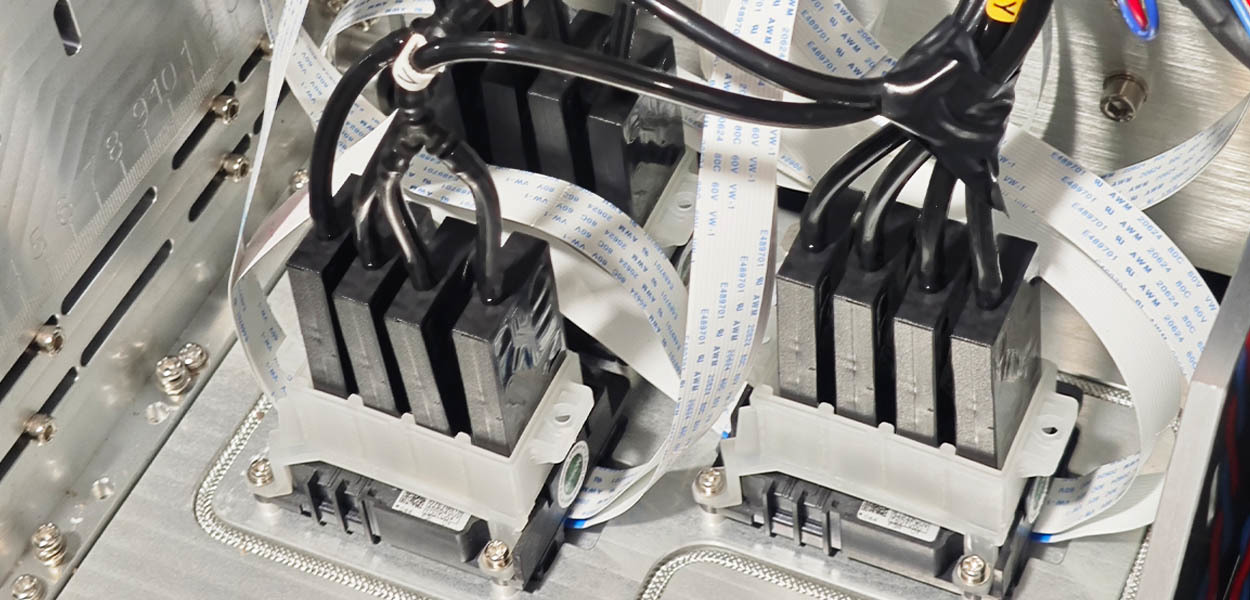
Regular Maintenance of UV Printheads
In addition to daily care, UV printheads also require regular professional maintenance. These measures help provide deep cleaning and address blockages that have not been resolved during routine cleaning. Below are key points for regular maintenance:
1. Printhead Soaking Method
When a printhead experiences severe clogging, the soaking method can be used for deep cleaning. This method is suitable for less severe blockages. The steps are as follows:
- Remove the printhead from the printer and soak the nozzle area in the specialized cleaning liquid.
- Place the printhead flat in a small dish, and immerse the nozzle portion in the cleaning liquid, avoiding contact with electrical parts.
- Soak for 1 to 4 hours, depending on the severity of the clog. Only use UV printhead cleaning fluid, not general cleaners, to prevent damage.
This method helps dissolve and remove dried ink and debris from the printhead. However, it is important to avoid soaking for too long, as extended exposure can damage the printhead.
2. Nozzle Pressure Washing Method
For more severe blockages, the nozzle pressure washing method can be used. This method uses an injector to apply pressure, forcing the cleaning fluid through the nozzle to clear the blockage. The steps are as follows:
- Use a syringe and disposable infusion device to inject the cleaning fluid into the ink inlet of the printhead.
- Control the pressure carefully to avoid damaging the printhead with excessive force.
- Repeat the process until the cleaning fluid flows through all the ink nozzles.
This method is effective for clearing blockages at the nozzle and restoring proper ink flow.
3. Inspect and Replace the Printhead
If, after multiple cleaning attempts, the printhead still fails to restore normal operation, it may need to be replaced. In this case, it is advisable to contact your UV printer supplier for professional technical service.
Conclusion
Maintaining UV printheads is essential for ensuring print quality, extending equipment lifespan, and reducing maintenance costs. By regularly performing daily care and maintenance, issues such as printhead blockages and other failures can be effectively avoided, ensuring that the printer operates stably for the long term. In daily use, special attention should be paid to the printing environment, regular cleaning of the printhead, and proper use of the equipment. If serious clogging or failure occurs, deep cleaning methods such as soaking, pressure washing, or ultrasonic cleaning can be employed. If necessary, professional services should be contacted for repairs or printhead replacement.
Good maintenance habits not only improve the printer’s efficiency but also greatly extend its service life, saving companies substantial repair costs. Therefore, UV printer users should select appropriate maintenance methods based on actual conditions and strictly follow operational guidelines for printhead care and cleaning to ensure optimal equipment performance.
Contact Us
Global sales e-mail: info@hanrunpaper.com
Global sales WhatsApp: 86 189 3686 5061
Address: No.10 building, Baijiahui Innovation Community, 699-18 Xuanwu Avenue, Nanjing, China
Need Local Support? Find a Certified Hanrun Paper Dealer in Your Area.



Transfer To Digital, Transfer To Future
Hanrunpaper
Customers From
Countries
Contact us

Address:No.10 building, Baijiahui Creative Community, 699-18 Xuanwu Avenue, Nanjing, China