What factors should be considered when selecting a UV printer?
With the continuous advancement of printing technology, UV digital printers have gradually become highly sought-after equipment in the market due to their excellent print quality and diverse application scenarios. Whether in the advertising industry, the personalized customization field, or industrial production, UV printers have gained increasing popularity among businesses for their efficiency and precision. For companies looking to purchase a UV printer, selecting the right equipment is crucial.
What is a UV printer?
A UV printer is a printing device that uses ultraviolet light sources to cure inks rapidly. Its uniqueness lies in the fact that UV inks are instantly cured by UV light during the printing process, allowing high-quality printing on a wide range of materials. The application range of UV printers is extensive, suitable for materials such as wood, metal, plastic, glass, ceramics, and leather, significantly expanding the scope of traditional printing.
How to select the right UV printer?
When choosing the right UV printer, users need to consider multiple factors to ensure the device meets business needs, improves production efficiency, and ensures print quality.
1. Define the core usage scenarios
Business type match
Advertising and signage users: Focus on media compatibility (e.g., acrylic, metal, flexible film) and quick material change functions to meet diverse advertising and signage demands.
Industrial manufacturing users: Emphasize continuous production stability and choose equipment capable of operating 24/7 to ensure production line continuity and stability.
Personalized customization users: Pay attention to color reproduction accuracy and choose devices capable of accurately printing on complex patterns like leather textures and gradient effects.
Production volume requirements
Startups: Opt for desktop UV printers with a daily output of ≤50㎡, offering lower costs suitable for small-scale production.
Medium-sized enterprises: Choose dual-position alternating printers with a daily output of 100-300㎡ to increase production efficiency.
Large factories: Equipped with line-connected systems with a daily output of over 500㎡ for large-scale automated production.

2. Key operational experience indicators
User-friendly interface: For operators without extensive technical backgrounds, it is crucial to select a UV printer with an intuitive, easy-to-understand interface. Simplified operational workflows reduce learning costs and enhance work efficiency.
Software operation: Ensure the accompanying software is user-friendly, allowing quick import of design files and offering reasonable printing settings. If the software is overly complex, it may increase the likelihood of operational errors, particularly for beginners.
Printhead cleaning and maintenance: UV printers require regular cleaning of the printheads. Selecting equipment with automatic humidification, self-cleaning functions, or easy-to-clean components can reduce manual maintenance difficulty and frequency.
Consumables replacement: The ease of maintenance cycles and consumables replacement is another consideration. For instance, assess whether ink bottle replacement is convenient or whether printheads are easy to clean or replace.
Fault troubleshooting: Users should check whether the printer has fault diagnosis and troubleshooting functions, such as automatic alarms or fault indicators, which are essential for minimizing downtime and enhancing production efficiency.
3. Control of operating costs
Initial investment and long-term costs: Although UV printers may have high initial investment costs, their lifespan, ink and consumable costs, and operational efficiency significantly impact cost control in the long term. Users should evaluate total costs rather than focusing solely on the purchase price.
Consumables and ink prices: Choose equipment with reasonably priced consumables and inks, particularly for small and medium-sized producers, to avoid high operational costs in the future. Ink consumption and maintenance costs are key factors to consider for long-term use.
4. Space adaptability requirements
Space requirements: UV printers are generally large, and users should consider whether their workspace can accommodate the equipment. Ensure the device can be installed smoothly without spatial constraints during production.
Noise and environmental impact: Some UV printers may generate considerable noise or odors. Considering operational comfort and health factors, users should pay attention to the noise level and environmental standards of the equipment.
5. Production process optimization
Print speed: Users should balance print speed and quality, especially for high-output production lines. Excessively high print speeds may compromise quality, while slow speeds could impact production efficiency. Selecting the appropriate speed based on production requirements is critical.
Batch production capability: For large-scale production, users need to consider the stability, load capacity, and ability of the equipment to operate continuously for extended periods.
6. Print quality and consistency
Color consistency: The color accuracy and consistency of UV printers are vital for most applications (e.g., advertising production, fine printing). Users should ensure the printer can consistently produce high-quality images without color discrepancies.
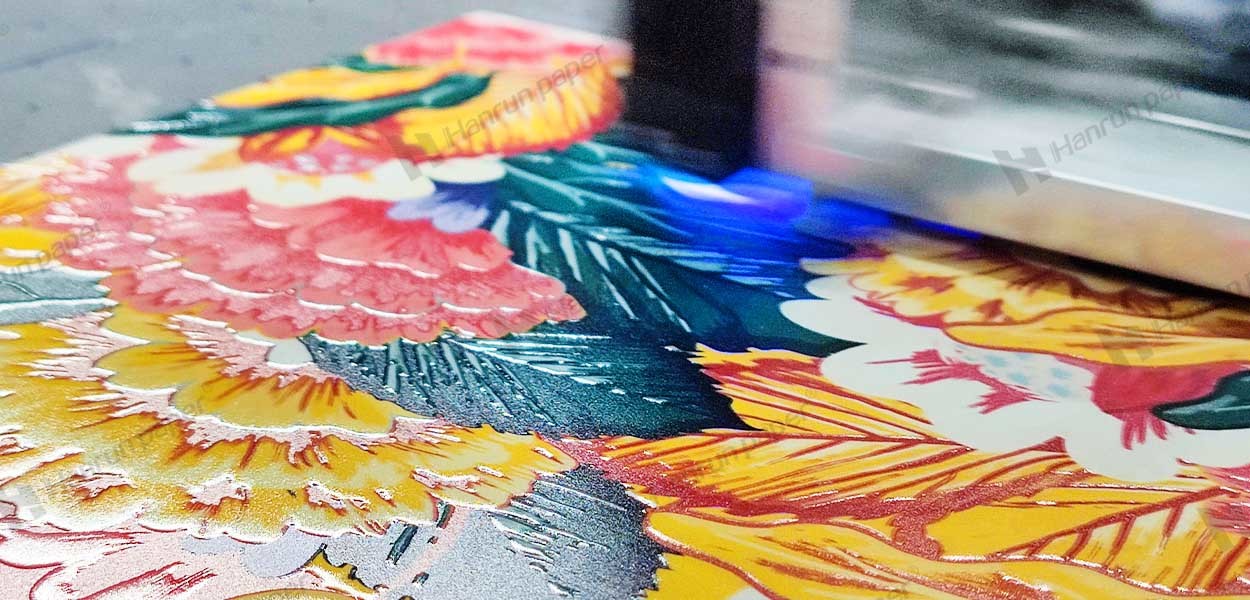
Details and special effects: For fine designs (e.g., patterns, text) or when printing special effects (e.g., curved surfaces, glow-in-the-dark, embossing), the printer must maintain high precision and clear details.
7. Brand reputation and user feedback
Brand reputation: Choosing well-known brands usually ensures better equipment quality and more comprehensive after-sales service. Understanding feedback and reputation from other users, especially those within the same industry, provides valuable insight for making purchasing decisions.
User reviews: By reviewing online evaluations, forums, or social media user experiences, users can gain insights into the actual performance of the equipment, such as its stability, print quality, and after-sales service.
8. Decision-making priority suggestions
Startups: Focus on the cost-effectiveness of the equipment to meet initial production needs.
Upgrading users: Pay attention to technological evolution potential, selecting devices with reserved expansion channels (e.g., CMYK+W+varnish) for future upgrades.
Group purchases: Request equipment with SAAS-level management systems to enable remote monitoring of multiple devices and enhance management efficiency.
Summary
Selecting the right UV printer not only improves production efficiency but also enhances product quality, thereby strengthening your market competitiveness. Hanrun Paper UV printers, with their high-quality print results, wide application scenarios, and exceptional equipment performance, have become the preferred choice for many industry users. Whether you are in the advertising industry, personalized customization, or other industrial production, Hanrun Paper's UV printers can provide strong support for your business.
Contact Us
Global sales e-mail: info@hanrunpaper.com
Global sales WhatsApp: 86 189 3686 5061
Address: No.10 building, Baijiahui Innovation Community, 699-18 Xuanwu Avenue, Nanjing, China
Need Local Support? Find a Certified Hanrun Paper Dealer in Your Area.



Transfer To Digital, Transfer To Future
Hanrunpaper
Customers From
Countries
Contact us

Address:No.10 building, Baijiahui Creative Community, 699-18 Xuanwu Avenue, Nanjing, China